Several times, a customer has approached us with a request to merge multiple applications. How to do it?
First, let's clarify the terms. By merging, I do not mean a communication connection, but the merging of two or more configurations into one SCADA, MES, or EMS application. This contains the complete functionality of the original applications.
What could be the reasons?
- Better integration of applications and their users. In the past, we have implemented separate applications for evaluating ancillary services in electricity production for several customers. These were subsequently merged with the MES application due to the availability of data sources, unification of users, and better availability of MES evaluation results.
- Simplification of application care and cost reduction. It is cheaper to operate one larger application than several smaller ones (and each on its own Windows/Linux server).
- Merging organizations. We also experienced a case where, after the separation of the energy sector into a separate company, the EMS system was also “duplicated” into two, and after a few years (after the re-merger), we merged these two systems again.
- End of operation. In the case of the termination of electricity production in a particular plant, while some technologies were retained and it was also necessary to preserve historical data, the customer requested the merger of several applications into one - with the understanding that a large part of the technology and communications would already be shut down.
When merging applications, there is always one unpleasant thing. And that is a name conflict – the occurrence of objects with the same names. The conflict is more likely the more related these applications are. If they were created by the same supplier or the same team, they probably used the same modules, scripts, schemes, etc. As a result, there is a risk that such objects will be unintentionally “shared” and their data will be overwritten from different sides. How can we deal with this problem in Ipesoft D2000?
The good news is that it is much better than other SCADA/MES/IIoT platforms. Why is this so? Thanks to two important features:
- referential integrity
- easy renaming of objects
I have already written about referential integrity in a separate blog. Ipesoft D2000 maps and guards the relations between D2000 objects (measured points, calculated points, archive values, diagrams, graphs ...), so it knows exactly which object is related to another (e.g., it is used by it, or is in a parent-child relationship). Referential integrity is checked not only during editing but also during XML import, so it is not possible to import an inconsistent group of objects into the application (one that would have relations outside the imported and existing objects).
The second important feature is easy renaming of objects. Each D2000 object has a triple identifier (I have also written about it in a blog about SCADA architecture and DODM):
- Text name
- Numeric identifier (HOBJ – Handle of Object)
- Unique identifier (UID)
Internally, D2000 uses numeric identifiers, which are also the fastest when searching. So if a user renames a D2000 object, only its text name changes, and the D2000 just needs to save its new definition. There is no need to change anything in the configuration of other D2000 objects – including scripts written in ESL or Java!
How will referential integrity and easy renaming of objects help when merging applications?
Before merging (i.e., importing objects from one application into another), we rename the objects. It is ideal to give them a prefix that will distinguish individual applications. In addition, we can also set the prefix to UID – if someone renames the object in the future, the UID cannot be changed as easily as the name, and it will be clear from it the origin of the object.
The UID prefix is easiest to set directly in the configuration database when the application is turned off. We set it for all objects except SYSTEM (0), USER (12), and SYSVAR (22):
update objlist set "UUID" = 'App1.' || "UUID", "VERSION_OF_UUID"= ' App1.' || "VERSION_OF_UUID" where "TYP" not in (0, 12, 22);
Then we rename the objects. Again, this can be done manually in D200 CNF, using XML export and import, or more conveniently in the XML Tool utility, implemented as a D2000 scheme. Or directly in the configuration database. Here it is a bit more complicated, since the standard naming in D2000 specifies a prefix for some objects (line "L.", station "B.", measured point "M.", scheme "S.", etc.) and for others it does not (alarm, status text, bitmap, time channel, user, ...).
Therefore, it is necessary to perform two renames, depending on the type of object:
For objects with prefixes:
update objlist set "NAME" = SUBSTR("NAME", 1, 2) || App1.' || SUBSTR("NAME", 3, 99) where ("TYP" IN (16, 23, 31)) or ("TYP" > 1 and "TYP" < 8);
For objects without prefixes:
update objlist set "NAME" = App1.' || "NAME" where "TYP" in (11,13, 14, 15, 17, 18, 33, 40, 41, 48, 49, 50, 51);
In the case of objects of the Process type, the process type had to be taken into account. We manually renamed processes of KOM, CLC, EVH, DBM, ALA, API types (e.g., SELF.KOM to App1.SELF.KOM), as we wanted to separate the processes of individual applications. On the other hand, we kept SELF.ARC processes (handling archiving) unchanged so that the new application would have one large D2000 Archive, within which it is possible to combine historical values coming from all original applications.
In the case of objects of the User type, there are different possibilities. To give a prefix according to the application or unite users, and if one user is present in multiple applications, then keep one of them and assign it the appropriate Object Groups so that it has access to all necessary objects.
Finally, a screenshot from the D2000 Cnf of the merged application, which also includes the "CS" application. The total number of objects of the merged application is over 78 thousand, of which over 35 thousand objects were imported from the "CS" application.
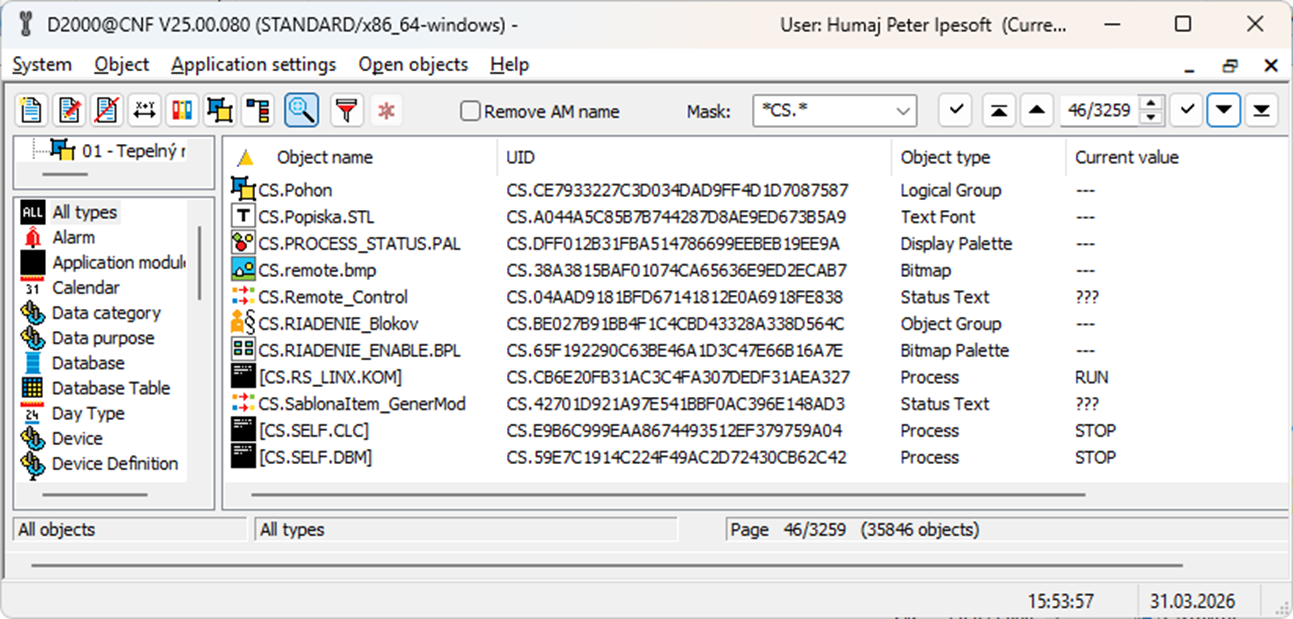
In addition to merging the configuration, it is also necessary to merge the archive databases - to load data from the "CS" application archive into the merged application archive. Here, it is necessary to run the arcsynchro utility for each archive value, specifying the /TID parameter to write to the table with the corresponding ID (HOBJ) in the target archive database.
Conclusion
Merging applications is probably one of the more complex operations – which may be why it is rarely mentioned in practice. In the case of applications built on Ipesoft D2000 technology, this operation is also relatively easy. Thanks to referential integrity and triple identifiers of D2000 objects, renaming objects as well as importing them into the target application is convenient and without the risk of conflicts or inconsistencies. Even relatively large SCADA applications can be merged quickly, and even users who may not be familiar with application details can handle it. Like me 😉
March 31, 2026, Ing. Peter Humaj, www.ipesoft.com
